Agent of Empires
A terminal session manager for Linux and macOS using tmux to aid in management and monitoring of AI coding agents, written in Rust.
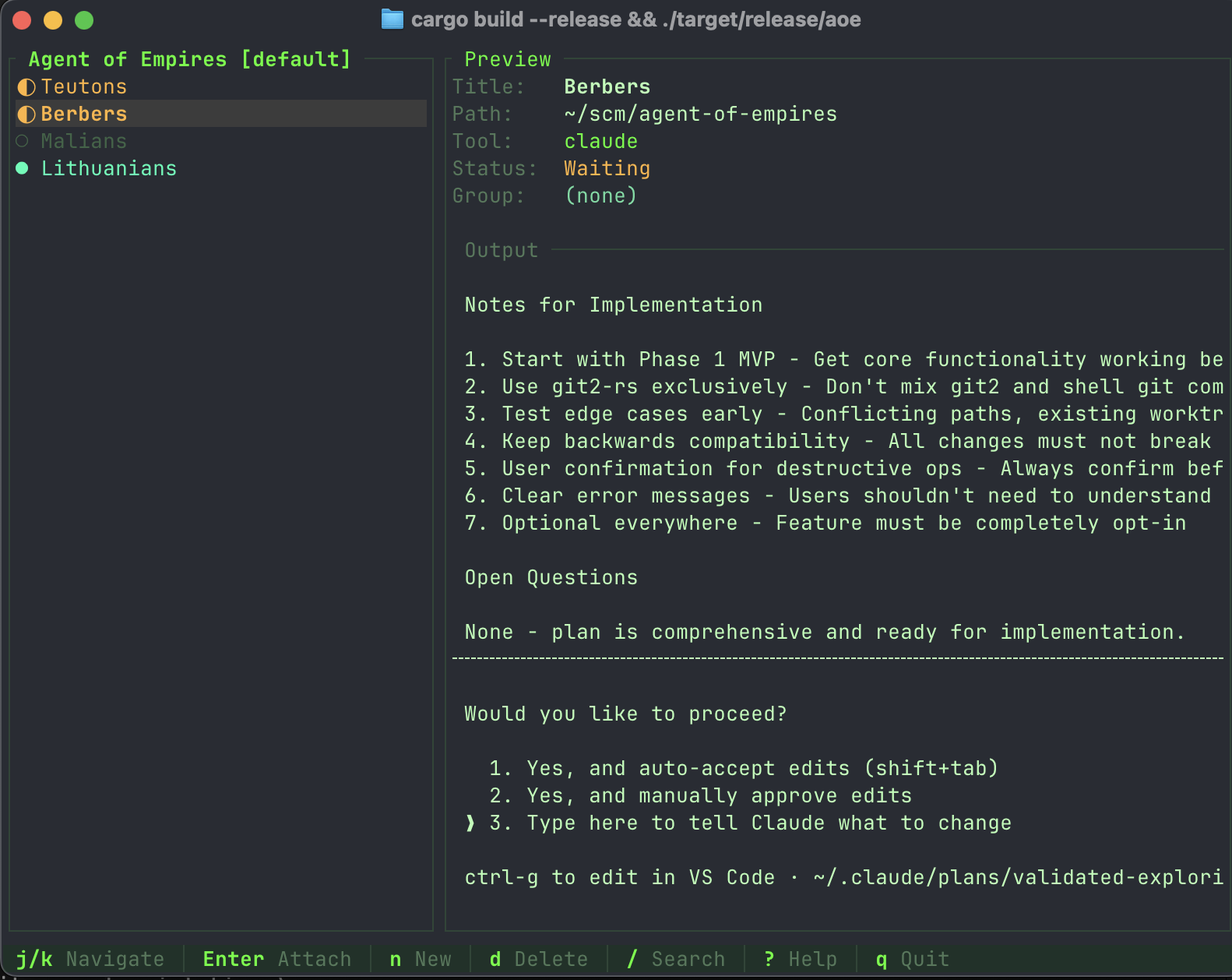
Features
- TUI Dashboard - Visual interface to manage all your AI coding sessions
- Session Management - Create, attach, detach, and delete sessions
- Group Organization - Organize sessions into hierarchical folders
- Status Detection - Automatic status detection for Claude Code and OpenCode
- tmux Integration - Sessions persist in tmux for reliability
- Multi-profile Support - Separate workspaces for different projects
- Git Worktrees - Run parallel agents on different branches of the same repo
How It Works
Agent of Empires (aoe) is a wrapper around tmux, the terminal multiplexer. Each AI coding session you create is actually a tmux session under the hood.
Once you attach to a session, you’re working directly in tmux. Basic tmux knowledge helps:
| tmux Command | What It Does |
|---|---|
Ctrl+b d | Detach from session (return to Agent of Empires) |
Ctrl+b [ | Enter scroll/copy mode |
Ctrl+b n / Ctrl+b p | Next/previous window |
If you’re new to tmux, the key thing to remember is Ctrl+b d to detach and return to the TUI.
Quick Links
- Installation - Get started with Agent of Empires
- Quick Start - Basic usage tutorial
- CLI Reference - Complete command documentation
- Git Worktrees Guide - Parallel development with worktrees
Installation
Prerequisites
Agent of Empires requires tmux to be installed on your system.
macOS:
brew install tmux
Ubuntu/Debian:
sudo apt install tmux
Fedora:
sudo dnf install tmux
Install Agent of Empires
Quick Install (Recommended)
Run the install script:
curl -fsSL \
  https://raw.githubusercontent.com/njbrake/agent-of-empires/main/scripts/install.sh \
  | bash
Homebrew
brew install njbrake/aoe/aoe
Update via brew update && brew upgrade aoe.
Build from Source
git clone https://github.com/njbrake/agent-of-empires
cd agent-of-empires
cargo build --release
The binary will be at target/release/aoe.
Verify Installation
aoe --version
Uninstall
To remove Agent of Empires:
aoe uninstall
This will guide you through removing the binary, configuration, and tmux settings.
Quick Start
Launch the TUI
The simplest way to use Agent of Empires is through the TUI dashboard:
aoe
This opens an interactive interface where you can:
- View all your coding sessions
- Create new sessions with
n - Attach to sessions with
Enter - Delete sessions with
d - Quit with
q
CLI Quick Reference
Add a Session
# Add session in current directory
aoe add

# Add session with custom title
aoe add -t "my-feature"

# Add and launch immediately
aoe add -l

# Add session for specific project
aoe add /path/to/project
List Sessions
# Table format
aoe list

# JSON format
aoe list --json
Manage Sessions
# Attach to a session
aoe session attach my-session

# Start a stopped session
aoe session start my-session

# Stop a running session
aoe session stop my-session

# Show session details
aoe session show my-session
Check Status
# Summary of all sessions
aoe status

# Detailed status
aoe status -v

# JSON format (for scripts)
aoe status --json
Profiles
Profiles let you maintain separate workspaces:
# Use default profile
aoe

# Use a specific profile
aoe -p work

# Create a new profile
aoe profile create client-xyz

# List all profiles
aoe profile list
Configuration
Configuration is stored in ~/.agent-of-empires/:
~/.agent-of-empires/
├── config.toml           # Global configuration
├── profiles/
│   └── default/
│       ├── sessions.json # Session data
│       └── groups.json   # Group structure
└── logs/                 # Session logs
Environment Variables
| Variable | Description |
|---|---|
AGENT_OF_EMPIRES_PROFILE | Default profile to use |
AGENT_OF_EMPIRES_DEBUG | Enable debug logging |
Next Steps
- See the CLI Reference for complete command documentation
- Learn about Git Worktrees for parallel development
Command-Line Help for aoe
This document contains the help content for the aoe command-line program.
Command Overview:
aoe↴aoe add↴aoe list↴aoe remove↴aoe status↴aoe session↴aoe session start↴aoe session stop↴aoe session restart↴aoe session fork↴aoe session attach↴aoe session show↴aoe session current↴aoe group↴aoe group list↴aoe group create↴aoe group delete↴aoe group move↴aoe profile↴aoe profile list↴aoe profile create↴aoe profile delete↴aoe profile default↴aoe worktree↴aoe worktree list↴aoe worktree info↴aoe worktree cleanup↴aoe uninstall↴
aoe
Agent of Empires (aoe) is a terminal session manager that uses tmux to help you manage and monitor AI coding agents like Claude Code and OpenCode.
Run without arguments to launch the TUI dashboard.
Usage: aoe [OPTIONS] [COMMAND]
Subcommands:
add— Add a new sessionlist— List all sessionsremove— Remove a sessionstatus— Show session status summarysession— Manage session lifecycle (start, stop, attach, etc.)group— Manage groups for organizing sessionsprofile— Manage profiles (separate workspaces)worktree— Manage git worktrees for parallel developmentuninstall— Uninstall Agent of Empires
Options:
-p,--profile <PROFILE>— Profile to use (separate workspace with its own sessions)
aoe add
Add a new session
Usage: aoe add [OPTIONS] [PATH]
Arguments:
-
<PATH>— Project directory (defaults to current directory)Default value:
.
Options:
-t,--title <TITLE>— Session title (defaults to folder name)-g,--group <GROUP>— Group path (defaults to parent folder)-c,--cmd <COMMAND>— Command to run (e.g., ‘claude’, ‘opencode’)-P,--parent <PARENT>— Parent session (creates sub-session, inherits group)-l,--launch— Launch the session immediately after creating-w,--worktree <WORKTREE_BRANCH>— Create session in a git worktree for the specified branch-b,--new-branch— Create a new branch (use with –worktree)
aoe list
List all sessions
Usage: aoe list [OPTIONS]
Options:
--json— Output as JSON--all— List sessions from all profiles
aoe remove
Remove a session
Usage: aoe remove [OPTIONS] <IDENTIFIER>
Arguments:
<IDENTIFIER>— Session ID or title to remove
Options:
-k,--keep-worktree— Keep worktree directory (don’t delete it)
aoe status
Show session status summary
Usage: aoe status [OPTIONS]
Options:
-v,--verbose— Show detailed session list-q,--quiet— Only output waiting count (for scripts)--json— Output as JSON
aoe session
Manage session lifecycle (start, stop, attach, etc.)
Usage: aoe session <COMMAND>
Subcommands:
start— Start a session’s tmux processstop— Stop session processrestart— Restart sessionfork— Fork Claude session with contextattach— Attach to session interactivelyshow— Show session detailscurrent— Auto-detect current session
aoe session start
Start a session’s tmux process
Usage: aoe session start <IDENTIFIER>
Arguments:
<IDENTIFIER>— Session ID or title
aoe session stop
Stop session process
Usage: aoe session stop <IDENTIFIER>
Arguments:
<IDENTIFIER>— Session ID or title
aoe session restart
Restart session
Usage: aoe session restart <IDENTIFIER>
Arguments:
<IDENTIFIER>— Session ID or title
aoe session fork
Fork Claude session with context
Usage: aoe session fork [OPTIONS] <IDENTIFIER>
Arguments:
<IDENTIFIER>— Session ID or title to fork
Options:
-t,--title <TITLE>— Custom title for forked session-g,--group <GROUP>— Target group for forked session
aoe session attach
Attach to session interactively
Usage: aoe session attach <IDENTIFIER>
Arguments:
<IDENTIFIER>— Session ID or title
aoe session show
Show session details
Usage: aoe session show [OPTIONS] [IDENTIFIER]
Arguments:
<IDENTIFIER>— Session ID or title (optional, auto-detects in tmux)
Options:
--json— Output as JSON
aoe session current
Auto-detect current session
Usage: aoe session current [OPTIONS]
Options:
-q,--quiet— Just session name (for scripting)--json— Output as JSON
aoe group
Manage groups for organizing sessions
Usage: aoe group <COMMAND>
Subcommands:
list— List all groupscreate— Create a new groupdelete— Delete a groupmove— Move session to group
aoe group list
List all groups
Usage: aoe group list [OPTIONS]
Options:
--json— Output as JSON
aoe group create
Create a new group
Usage: aoe group create [OPTIONS] <NAME>
Arguments:
<NAME>— Group name
Options:
--parent <PARENT>— Parent group for creating subgroups
aoe group delete
Delete a group
Usage: aoe group delete [OPTIONS] <NAME>
Arguments:
<NAME>— Group name
Options:
--force— Force delete by moving sessions to default group
aoe group move
Move session to group
Usage: aoe group move <IDENTIFIER> <GROUP>
Arguments:
<IDENTIFIER>— Session ID or title<GROUP>— Target group
aoe profile
Manage profiles (separate workspaces)
Usage: aoe profile [COMMAND]
Subcommands:
list— List all profilescreate— Create a new profiledelete— Delete a profiledefault— Show or set default profile
aoe profile list
List all profiles
Usage: aoe profile list
aoe profile create
Create a new profile
Usage: aoe profile create <NAME>
Arguments:
<NAME>— Profile name
aoe profile delete
Delete a profile
Usage: aoe profile delete <NAME>
Arguments:
<NAME>— Profile name
aoe profile default
Show or set default profile
Usage: aoe profile default [NAME]
Arguments:
<NAME>— Profile name (optional, shows current if not provided)
aoe worktree
Manage git worktrees for parallel development
Usage: aoe worktree <COMMAND>
Subcommands:
list— List all worktrees in current repositoryinfo— Show worktree information for a sessioncleanup— Cleanup orphaned worktrees
aoe worktree list
List all worktrees in current repository
Usage: aoe worktree list
aoe worktree info
Show worktree information for a session
Usage: aoe worktree info <IDENTIFIER>
Arguments:
<IDENTIFIER>— Session ID or title
aoe worktree cleanup
Cleanup orphaned worktrees
Usage: aoe worktree cleanup [OPTIONS]
Options:
-f,--force— Actually remove worktrees (default is dry-run)
aoe uninstall
Uninstall Agent of Empires
Usage: aoe uninstall [OPTIONS]
Options:
--keep-data— Keep ~/.agent-of-empires/ (sessions, config, logs)--keep-tmux-config— Keep tmux configuration--dry-run— Show what would be removed without removing-y— Skip confirmation prompts
This document was generated automatically by
clap-markdown.
Git Worktree - Quick Reference
CLI vs TUI Behavior
| Feature | CLI | TUI |
|---|---|---|
| Create new branch | Use -b flag | Always creates new branch |
| Use existing branch | Omit -b flag | Not supported |
| Branch validation | Checks if branch exists | None (always creates) |
One-Liner Commands
# Create worktree session (new branch)
aoe add . -w feat/my-feature -b

# Create worktree session (existing branch)
aoe add . -w feat/my-feature

# List all worktrees
aoe worktree list

# Show session info
aoe worktree info <session>

# Find orphans
aoe worktree cleanup

# Remove session (prompts for worktree cleanup)
aoe remove <session>

# Remove session (keep worktree)
aoe remove <session> --keep-worktree
TUI Keyboard Shortcuts
| Key | Action |
|---|---|
n | New session dialog |
Tab | Next field |
Shift+Tab | Previous field |
←/→ | Toggle tool selection (when on tool field) |
Enter | Submit and create session |
Esc | Cancel |
Note: When creating a session with a worktree branch name in the TUI, it will automatically create a new branch and worktree.
Default Configuration
[worktree]
enabled = false
path_template = "../{repo-name}-worktrees/{branch}"
auto_cleanup = true
show_branch_in_tui = true
Template Variables
{repo-name}- Repository folder name{branch}- Branch name (slashes → hyphens){session-id}- First 8 chars of UUID
Common Path Templates
# Default (sibling directory)
path_template = "../{repo-name}-worktrees/{branch}"

# Nested in repo
path_template = "./worktrees/{branch}"

# Absolute path
path_template = "/absolute/path/to/worktrees/{repo-name}/{branch}"

# With session ID
path_template = "../wt/{branch}-{session-id}"
Quick Start
# 1. Enable worktrees (first time only)
cd ~/scm/my-project
aoe add . -w feat/test -b

# 2. Create parallel sessions in TUI
aoe
# Press 'n' and fill in the "Worktree (optional)" field:
#   - Title: UI Changes, Worktree: feat/ui-changes
#   - Title: API Changes, Worktree: feat/api-changes
#   - Title: Urgent Fix, Worktree: fix/urgent-bug
# Each session will create a new branch and worktree automatically

# 3. View all worktrees
aoe worktree list

# 4. Work and cleanup
aoe remove <session>  # Answer Y to delete worktree
Cleanup Behavior
| Scenario | Cleanup Prompt? |
|---|---|
| aoe-managed worktree | ✅ Yes (Y/n) |
| Manual worktree | ❌ No |
--keep-worktree flag | ❌ No (skips prompt) |
| Non-worktree session | ❌ No |
Workflow Examples
CLI Workflow
# Create 3 parallel feature sessions
cd ~/scm/my-app
aoe add . -w feat/ui -b
aoe add . -w feat/api -b
aoe add . -w feat/db -b

# View all
aoe worktree list

# Work in TUI
aoe  # See all 3 with branch names

# When done
aoe remove <id>  # Cleans up worktree
TUI Workflow
# Launch TUI
cd ~/scm/my-app
aoe

# Press 'n' to open new session dialog
# Fill in fields:
#   Title: Feature UI (or leave empty for random name)
#   Path: . (current directory)
#   Group: (optional)
#   Tool: claude (or select your tool)
#   Worktree (optional): feat/ui-changes
# Press Enter

# Creates:
#   ✅ New branch: feat/ui-changes
#   ✅ New worktree: ../my-app-worktrees/feat-ui-changes
#   ✅ New session attached to worktree
#   ✅ Launches you into the session

# Repeat for more parallel sessions
File Locations
- Config:
~/.agent-of-empires/config.toml - Sessions:
~/.agent-of-empires/profiles/<profile>/sessions.json - Default Worktrees:
../<repo-name>-worktrees/
Error Messages
| Error | Solution |
|---|---|
| “Not in a git repository” | Navigate to git repo first |
| “Worktree already exists” | Use different branch name or session-id in template |
| “Failed to remove worktree” | May need manual cleanup with git worktree remove |
| “Branch already exists” (CLI only) | Branch exists; remove -b flag to use existing branch |
Pro Tips
- ✅ Use descriptive branch names (visible in TUI)
- ✅ Check preview panel before starting work
- ✅ Run
aoe worktree cleanupperiodically - ✅ Use
--keep-worktreewhen preserving work - ✅ Keep main repo on main/master branch